What is Metropolitan area network? Components of MAN
Published: 14 Dec 2025
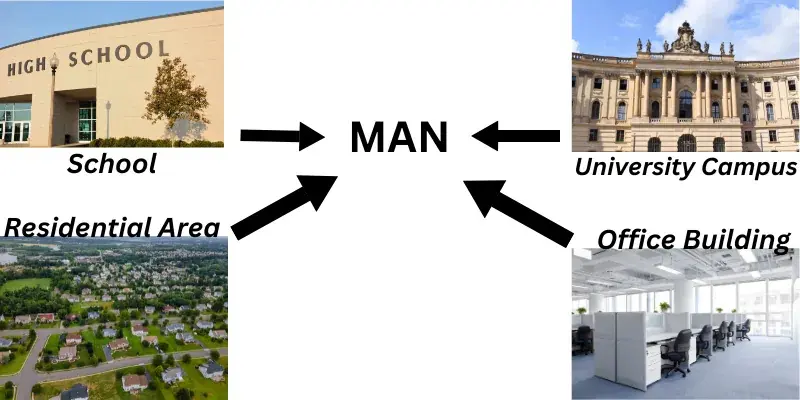
Did you know that Metropolitan Area Networks (MANs) power entire cities’ digital infrastructure? A MAN is a high-speed network that connects offices, schools, and government buildings across a metropolitan area, bigger than your home Wi-Fi but smaller than the global internet. Cities rely on MANs for traffic management, public Wi-Fi, and secure data sharing between institutions. For example, when you check out a book from one library branch and return it to another, a MAN makes it possible. These networks use fiber optics or wireless towers to transfer data faster than standard internet. If you’ve ever wondered how hospitals share patient records instantly or how universities link their campuses, MANs are the invisible heroes. Let’s break down how metropolitan area network work and why they matter!
Definition of MAN
A Metropolitan Area Network (MAN) is a high-speed computer network that connects multiple locations, like offices, schools, or government buildings, across a city or large campus. It’s larger than a Local Area Network (LAN) but smaller than a Wide Area Network (WAN), offering faster, more secure data sharing than the public internet. MANs use fiber optics or wireless links to enable seamless communication between local institutions.
History of Metropolitan Area Network
The Early Days (1980s–1990s)
In the 1980s, cities faced a big problem. Offices and schools needed to share data faster than old telephone lines allowed. Small Local Area Networks (LANs) worked for single buildings but couldn’t connect whole cities. This gap sparked the idea for Metropolitan Area Networks. Early MANs linked university campuses or government offices across town. Telephone companies tested new technologies to speed things up. One key solution was FDDI, or Fiber Distributed Data Interface. FDDI used fiber optic cables to move data quickly and reliably. Hospitals adopted MANs first to send patient records securely between branches. By the 1990s, MANs became essential for urban growth, helping banks, libraries, and city services work together smoothly.
The Modern Era (2000s–Today)
The 2000s made MANs cheaper and faster. Ethernet technology replaced older systems like FDDI because it was simpler and more affordable. Fiber optic cables spread widely, letting cities build stronger networks. Wireless MANs also emerged, like WiMAX, which used towers instead of cables. Cities began offering free public Wi-Fi hotspots using MAN infrastructure. Schools connected campuses to share digital classrooms and resources. Businesses saved money by using MANs instead of expensive leased lines. Today, MANs power smart city projects worldwide. Think of traffic sensors that reduce jams or smart grids that manage electricity. Technologies like MPLS make data routing efficient, while cloud integration boosts flexibility. MANs keep evolving, supporting everything from emergency services to eco-friendly initiatives.
Working of MAN
A Metropolitan Area Network connects buildings across a city using cables or wireless links. Fiber optic cables are the most common choice because they send data as light pulses for superfast speeds. Sometimes, wireless towers (like WiMAX) link locations too. Each building has a router or switch to manage incoming and outgoing data. These devices act like traffic directors, choosing the best path for information. Data travels as small packets, similar to letters in a mail system. The network covers key spots like offices, schools, or hospitals within 5–50 km. This setup avoids the public internet, making transfers faster and more secure.
When you send a file across a MAN, routers split it into packets and add address labels. These packets zip through fiber optic cables or wireless signals to their destination. Switches then reassemble the packets into the original file. Security tools like firewalls and encryption protect data from outsiders. Real-time applications thrive here—hospitals share X-rays instantly, traffic lights sync with sensors, or libraries lend e-books across branches. If a cable fails, backups reroute traffic automatically. MANs also link to wider networks (like the internet) through gateways when needed. This makes them perfect for smart cities and large organizations.
Core Components of MAN
1. Fiber Optic Cables
These glass wires send data as light pulses for superfast transfer. They link buildings across the city like underground data highways.
2. Routers
Routers act as traffic directors for data packets. They choose the quickest path between locations.
3. Switches
Switches connect devices within a building, like computers or printers. They send data only to the intended device on the local network.
4. Wireless Towers (e.g., WiMAX)
These beam signals between sites without cables. They work like radio stations for internet connections.
5. Servers
Servers are central computers storing shared files or apps. Example: A library’s digital book database accessed by all branches.
6.Firewalls
Firewalls block hackers and viruses from entering the network. They act like security guards checking incoming data.
7. Encryption Tools
These scramble data into secret codes during transfer. Only authorized users with keys can decode the information.
8. Gateways
Gateways connect the MAN to wider networks like the internet. They translate data between different network languages.
9. Backup Lines
Extra cables or wireless links provide backup if main lines fail. They keep the network running during outages.
10. Network Operating System (NOS)
This software manages all devices and traffic on the MAN. It monitors performance and fixes errors automatically.
Quick Reference: MAN Components
| Component | Role | Everyday Example |
| Fiber Optic Cables | High-speed data highways | Like city water pipes, but for data |
| Routers | Traffic directors | GPS for data packets |
| Firewalls | Security guards | Bouncers at a club |
| WiMAX Towers | Wireless signal beams | Radio towers for internet |
Types of Metropolitan Area Network
1. Fiber Optic MAN
Imagine glass wires thinner than hair, carrying data as beams of light. This is a Fiber Optic MAN. Light travels through these cables at incredible speeds, almost like lightning. Rain, wind, or electrical noise won’t disrupt it. Cities use it for critical services: Hospitals send X-rays between branches in seconds. Police stations share security footage instantly. Though expensive to install, it lasts decades with minimal maintenance. It’s perfect for busy urban areas needing zero delays. If speed and reliability matter most, fiber is the answer.
2. Ethernet MAN
This network uses the same cables as your home internet, simple copper wires or modern Ethernet cords. It’s affordable and easy to set up. Picture a coffee shop chain linking registers across town to track daily sales. Speeds range from basic (10 Mbps for emails) to fast (10 Gbps for video backups). It handles files, security cameras, and apps smoothly. Not as powerful as fiber, but ideal for shops, schools, or small offices. If you want a budget-friendly city network, Ethernet MAN works great.
3. Wireless MAN (WiMAX)
No cables? No problem! WiMAX uses radio towers to beam internet signals like invisible bridges. Towers can cover up to 50 km, connecting farms, forests, or remote clinics. A farmer might check barn sensors or weather data from home. Speeds match home broadband (up to 100 Mbps). Thick walls or storms can weaken signals, but it’s perfect where digging trenches is impossible. Setup takes hours, not months. Best for villages, parks, or disaster zones needing quick connections.
4. Microwave MAN
Think of two dish antennas “talking” using microwave beams (like super-powered walkie-talkies). Towers must see each other clearly, no hills or skyscrapers blocking the path. Firefighters use it during floods to set up emergency networks fast. Data flies quickly, but heavy rain or birds can interrupt signals. It’s cheaper than fiber and works where cables can’t reach. Ideal for linking mountaintop stations, islands, or construction sites temporarily.
5. Hybrid MAN
Why choose one technology? Hybrid MANs mix fiber, wireless, and copper wires. If a cable snaps, wireless instantly takes over. A university might use fiber for labs, Wi-Fi for dorms, and Ethernet for old libraries. Cities save money by reusing existing wires in historic districts. It’s flexible and disaster-proof but needs careful planning. Hospitals use hybrids to keep networks running during power outages. Best for large, varied areas needing backup options.
6. DQDB (Distributed Queue Dual Bus)
Picture two parallel roads where data “cars” drive in opposite lanes. DQDB was the 1980s’ solution for linking libraries or town offices. Data waits politely in line, no cutting allowed! It’s fair and simple but slow by today’s standards (max 150 Mbps). Modern networks like Ethernet replaced it. You’ll only find DQDB in old systems or textbooks. Still, it taught us how to manage city-scale data flow.
7. ATM MAN (Asynchronous Transfer Mode)
ATM chops data into tiny, identical “containers” for smooth travel. Banks loved it for secure money transfers, $1 million moves as safely as an email. It handles video calls and alarms without glitches. But it’s complex and costly, like solving a giant puzzle. Most companies now use simpler Ethernet. ATM survives in stock exchanges or military bases where zero mistakes matter most.
8. MPLS MAN (Multiprotocol Label Switching)
MPLS sticks “express lane” labels on data packets. Routers read these labels to skip traffic, like an ambulance speeding through streets. Companies use it to prioritize video calls over emails. Hospitals share MRI scans in real time. It’s secure (data never touches the public internet) and rarely fails. Setup is tricky, but once running, it’s flawless for voice, video, and giant files.
| Type | Best For | Weakness | Real Example |
| Fiber Optic | Speed-critical tasks | High cost | Hospital imaging systems |
| Ethernet | Small businesses | Limited distance | Retail store chains |
| WiMAX | Remote areas | Weather disruptions | Farm sensor networks |
| MPLS | Real-time data | Complex setup | Corporate video calls |
| Benefits of MAN |
|---|
|
A MAN is a high-speed network connecting locations across a city or large campus (e.g., schools, offices). It’s bigger than a home network (LAN) but smaller than the internet (WAN). Example: City-wide public Wi-Fi or hospital data systems.
- LAN: Small (home/office).
- MAN: City-sized (libraries, campuses).
- WAN: Global (internet). MANs bridge LANs and WANs for local efficiency.
- City traffic control systems.
- University networks linking campuses.
- Government offices sharing secure data.
MANs use fiber optics or wireless towers to link buildings. Data travels via routers/switches at high speeds, avoiding public internet delays.
- Speed: Faster than internet for local data.
- Security: Private (unlike public Wi-Fi).
- Cost-effective: Saves on cloud/internet fees.
No! MANs are local networks, while the internet is global. Some MANs connect to the internet, but they operate independently.
Typically 5–50 km, covering a city or metro area. Larger than a LAN (1 km max) but smaller than a WAN (unlimited range).
- Fiber optic cables (most common).
- Wireless (microwave towers).
- Ethernet or ATM for data routing.
MANs avoid internet bottlenecks, ideal for real-time tasks (e.g., video calls between hospitals). Clouds rely on slower, less secure internet.
Yes, but not 100% hack-proof. Organizations add encryption and firewalls. Tip: Regular updates and strong passwords boost safety.
Conclusion
“So guys, in this article, we’ve covered Metropolitan Area Networks (MANs) in detail, from how they connect entire cities to why they’re faster and more secure than regular internet. Personally, I’d recommend MANs for schools, hospitals, or businesses that need reliable, high-speed connections across multiple locations. They’re a game-changer for local efficiency! Now, I’d love to hear from you: Could your workplace benefit from a MAN? Drop your thoughts in the comments. let’s discuss!”

- Be Respectful
- Stay Relevant
- Stay Positive
- True Feedback
- Encourage Discussion
- Avoid Spamming
- No Fake News
- Don't Copy-Paste
- No Personal Attacks
- Be Respectful
- Stay Relevant
- Stay Positive
- True Feedback
- Encourage Discussion
- Avoid Spamming
- No Fake News
- Don't Copy-Paste
- No Personal Attacks
