What is Personal Area Network? Working of PAN
Published: 17 Dec 2025
Did you know that most people use a personal area network every single day without even realizing it? A personal area network, or PAN, is a small network that connects your personal devices over a short distance. For example, when your phone connects to Bluetooth earphones or when your smartwatch syncs your steps, that is a PAN at work. These networks usually work within a range of about ten meters. You do not need Wi-Fi or a router. The devices connect directly using Bluetooth, USB, or other short-range technology. PANs are simple, fast, and built for everyday use. In this post, you will learn how Personal Area Networks work, where you use them, and why they are so useful.
Definition of Personal Area Network
A Personal Area Network (PAN) is a small, short-range network used to connect devices close to one person. It typically works within a range of about 10 meters and links devices like smartphones, laptops, wireless headphones, and smartwatches. PANs allow these devices to share data and communicate directly, often using Bluetooth, USB, or infrared connections.
History of Wide Area network
The concept of Personal Area Networks (PANs) began to take shape in the late 1990s. At that time, the rise of portable devices like laptops and mobile phones created a need for short-range, wireless communication. In 1998, Bluetooth technology was introduced by Ericsson, which became the foundation for PANs. Bluetooth allowed devices to communicate over short distances without cables. It quickly gained popularity due to its low cost and ease of use. Around the same time, USB connections also improved how devices could connect in wired PANs. The idea was simple—let personal devices talk directly to each other. This was the start of modern PANs we use every day. Over the next few years, Bluetooth became a standard feature in phones, headsets, and laptops. It made PANs more common in daily life without most users even realizing it.
As technology advanced in the 2000s, PANs continued to evolve. Bluetooth improved with better range, speed, and security in newer versions. Infrared and Zigbee were also used in early PAN setups, especially in smart home devices. Over time, more gadgets like smartwatches, fitness trackers, and wireless keyboards began using PANs. The growth of mobile computing and wearable tech made PANs even more important. Developers focused on making these networks faster and more reliable. Today, PANs support both wired and wireless connections, giving users flexibility and convenience. They’re now part of everyday life, used in cars, homes, schools, and offices. Though the term “PAN” isn’t commonly used by average users, the technology is everywhere. Its simple goal remains the same: connect personal devices easily and efficiently.
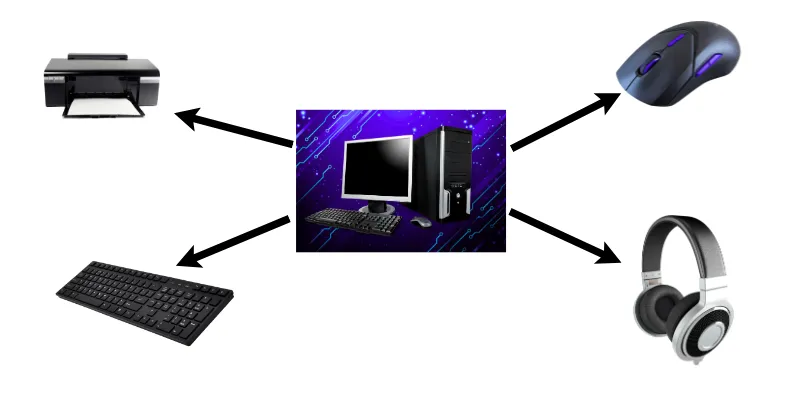
Working of Wide Area network
A Personal Area Network works by linking devices close to one person using short-range communication. The most common technology used is Bluetooth, which allows devices to connect wirelessly within about 10 meters. For example, when you connect your phone to wireless earbuds, you are creating a PAN. These devices use radio signals to find and pair with each other. Once paired, they can send and receive data like music, messages, or files. PANs can also work using cables, like when a keyboard connects to a laptop via USB. No internet or router is needed for most PANs to function. They’re built for fast, easy, and private communication between your own devices.
In a PAN, one device often acts as the main controller, like your phone or laptop. It connects with other smaller devices like a smartwatch, mouse, or wireless speaker. Each connected device plays a role, some send data, some receive it, and some do both. The connection stays active as long as the devices are within range. If one device moves too far away, the PAN may disconnect. These networks are usually set up automatically after the first pairing. This makes them simple and quick to use every day. PANs are ideal for personal tasks and small-scale communication between nearby gadgets.
Components of a Wide Area Network (WAN)
1. Switches
Switches manage data traffic within a local network. They help devices like computers and printers communicate smoothly.
2. Transmission Media
This includes fiber optic cables, satellites, and wireless signals. These carry data over long distances from one network to another.
3. End Devices
These are the devices people use, like computers, smartphones, or servers. They send and receive the data that travels across the WAN.
4. WAN Service Providers
These are companies that provide internet lines or satellite services. They make long-distance connections possible for homes and businesses.
5. Firewalls and Security Devices
These protect the network from hackers and unwanted access. They keep data safe as it moves across public and private networks.
6. Repeaters and Signal Boosters
These tools strengthen signals that travel long distances. They help prevent data loss or weak connections in a WAN.
7. VPN (Virtual Private Network)
VPNs create secure, private tunnels inside public networks. They protect user data and are commonly used in business WANs.
8. Cloud Services
Cloud platforms like Google Drive or Dropbox store and access data online. They are often part of modern WANs used for sharing and backup.
Types of Personal Area Network
1. Wired PAN
A Wired Personal Area Network uses physical cables to connect personal devices. One of the most common examples is using a USB cable to connect your smartphone to a laptop. This type of PAN offers a strong and stable connection with fast data transfer speeds. It’s very reliable because there’s less chance of interference from other signals. Wired PANs are also more secure since it’s hard for someone else to access your data unless they have physical access to the device. This type is often used when transferring large files or charging devices while syncing them. It works well in offices or homes where devices are used close together. Wired connections don’t need batteries or wireless signals to function, which makes them simple to set up. Though not as flexible as wireless networks, wired PANs are still common today. They are useful when speed, stability, and security are top priorities.
2. Wireless PAN
A Wireless PAN connects devices using signals instead of cables. This type of PAN allows you to link gadgets like your phone, smartwatch, and Bluetooth headphones without any wires. The most popular technologies used in wireless PANs are Bluetooth, infrared, Zigbee, and NFC. Wireless PANs are very convenient because you can move around freely while staying connected. These networks usually work within a short range—about 10 meters or less. They are often used in homes, offices, and cars for quick, wireless communication. Wireless PANs are easy to set up and don’t require much technical knowledge. Devices automatically detect and pair with each other. However, since they rely on signals, they may be affected by walls, distance, or other electronics nearby. Still, wireless PANs are the most common type used today due to their comfort and flexibility.
3. Bluetooth PAN (Piconet)
A Bluetooth PAN, also called a Piconet, is a type of wireless PAN that uses Bluetooth technology. In a piconet, one device acts as the main controller (called the master), and it connects to up to seven other devices (called slaves). For example, your phone (master) can connect to your wireless headphones, fitness band, and speaker at the same time. This setup is perfect for short-range communication, usually within 10 meters. Bluetooth PANs are common in everyday life because they’re easy to use and don’t need cables. Devices pair with each other once, and then connect automatically when in range. Bluetooth uses low power, so it’s ideal for battery-powered devices. Security features like PIN codes and pairing requests help protect data. Although the speed is slower than Wi-Fi, it’s perfect for small data transfers like music, calls, or notifications. Most modern devices already have Bluetooth built-in, making this type of PAN very accessible.
4. Infrared PAN
An Infrared PAN uses infrared light to send data between devices. It works like a TV remote—both devices must be close together and pointed at each other. This type of PAN was common in older phones and laptops before Bluetooth became popular. Infrared PANs are simple and don’t require extra hardware in many cases. They provide a direct, secure line of communication because the signals can’t pass through walls. This makes it safer from outside interference but also limits its use. The range is usually very short—about one meter or less. It’s often used for tasks like transferring small files or syncing data. Infrared is still used in some office devices like printers or scanners. However, it is now less common due to the rise of faster and more flexible wireless technologies.
5. Zigbee-based PAN
Zigbee is a wireless technology used in some Personal Area Networks, especially for smart home devices. It is designed for low-power, low-speed connections between many devices. Zigbee PANs are useful when you need several devices to work together over short distances. For example, you might have smart lights, thermostats, and door sensors connected through Zigbee. These devices communicate with each other and a central hub, often called a coordinator. Zigbee is known for using very little energy, which makes it perfect for battery-powered gadgets. It also supports mesh networking, where each device can relay data to others. This helps improve range and reliability in a home or office. Though it’s not as common as Bluetooth for personal devices, Zigbee is widely used in Internet of Things (IoT) setups. It provides safe, efficient control of many devices without using much bandwidth.
6. NFC (Near Field Communication) PAN
Near Field Communication, or NFC, is another type of wireless PAN that works over a very short range, just a few centimeters. It allows two devices to connect and exchange data when they are very close to each other or touching. A common example is tapping your phone on a card reader to make a payment. NFC PANs are fast, simple, and secure, which is why they are used in digital wallets like Google Pay and Apple Pay. They’re also used for pairing devices, like tapping two phones to share a contact or file. NFC doesn’t need any manual setup—it works instantly when devices come close. It uses very little power, so it’s great for smart cards, ID badges, and mobile payments. The small range keeps data safe from unwanted access. Even though it’s limited in range, NFC PANs are growing in popularity because of their ease and speed.
| Benefits of PAN |
|---|
|
A PAN connects devices close to you, usually within a few meters. It links gadgets like phones, laptops, headphones, and smartwatches to work together. PANs are small, private, and do not need the internet.
PANs usually use Bluetooth, USB, infrared, Zigbee, or NFC. Devices pair and send data directly without routers or Wi‑Fi. This makes setup quick, easy, and user-friendly.
Most PANs work within about 10 meters (around 30 feet). Infrared works only within line of sight, while Bluetooth reaches that full distance. This range keeps your data connection personal and secure.
PAN connects devices like smartphones, laptops, tablets, Bluetooth headphones, keyboards, mice, smartwatches, fitness trackers, printers, and smart home gadgets.
A PAN covers just around you and your devices. A LAN covers a room or building. A WAN covers a city or larger. PANs are small and personal, while LANs/WANs are much bigger
Yes. When your phone pairs to Bluetooth earbuds or a smartwatch, it forms a Bluetooth PAN (also called a piconet). It lets multiple devices connect and share data wirelessly.
Yes. A Bluetooth piconet lets one “master” device connect to up to seven active “slave” devices. Others can stay in parked mode waiting to connect
Yes, mostly. PANs use short-range connections, so it’s harder for outsiders to connect. Still, use secure pairing, strong passwords, and turn off Bluetooth when not in use.
Yes. You do not need Wi‑Fi or mobile data for a PAN to work. Devices like phones, laptops, and speakers can talk and share files offline.
Pros: Easy to set up, low cost, portable, low power use, secure within short range .
Cons: Limited range, slower data speeds than LAN, possible interference, not suited for large networks .
Conclusion
So guys, in this article, we’ve covered Personal Area Network in detail with real-life examples and simple terms. We looked at how it works, where it’s used, and why it makes everyday tech tasks easier. If you often connect your devices using Bluetooth or USB, you’re already using a PAN. I personally recommend getting familiar with how your devices connect, it can save time and make your setup smoother. Try using Bluetooth more often for file sharing or audio to get the most out of it. If you found this helpful, keep exploring more basic tech terms with us and share this post with someone who might need it.

- Be Respectful
- Stay Relevant
- Stay Positive
- True Feedback
- Encourage Discussion
- Avoid Spamming
- No Fake News
- Don't Copy-Paste
- No Personal Attacks
- Be Respectful
- Stay Relevant
- Stay Positive
- True Feedback
- Encourage Discussion
- Avoid Spamming
- No Fake News
- Don't Copy-Paste
- No Personal Attacks
