QWERTY vs QWERTZ: Choose Which Layout is Best for You – The Complete Guide 2026
Published: 19 Jan 2026
The qwerty and qwertz difference debate often confuses people new to international keyboards, but it boils down to simple adaptations for language efficiency. QWERTY rules English-speaking countries worldwide, while QWERTZ is the go-to in Central Europe like Germany, Austria, and Switzerland. The core difference? A swap of the “Y” and “Z” keys, plus better support for German umlauts and special characters. These layouts affect typing speed, comfort, and daily productivity, especially for bilingual users or travelers.
This comprehensive guide explores everything from historical origins and technical differences to real-world pros/cons, switching tips, regional variations, and the most-searched FAQs. Whether you’re a tech professional debating a layout change or just curious, read on for detailed insights based on user experiences and keyboard standards.
1. What is the QWERTY Layout? QWERTY vs QWERTZ
The QWERTY layout – named after the first six letters on its top row (Q-W-E-R-T-Y) – was invented in the 1870s by Christopher Latham Sholes, a newspaper editor from Milwaukee, Wisconsin. Working with mechanics at E. Remington and Sons, Sholes designed it for the Remington No. 2 typewriter, the first commercially successful model. Early typewriters jammed easily when typists struck common letter pairs like “th,” “st,” or “er” too quickly, as metal typebars tangled.
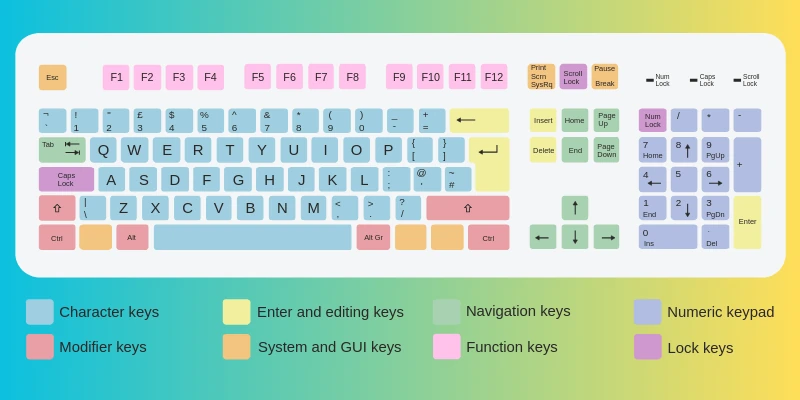
Sholes’ genius fix? Rearrange keys to deliberately slow down experts by placing frequent letters farther apart. E and T (English’s top letters) went to opposite hands; vowels and consonants alternated. This anti-jamming design prioritized reliability over raw speed. By the 1880s, QWERTY dominated US offices, schools, and telegraphy. Despite speedier rivals like Dvorak (1936, promising 20-40% gains) or Colemak, QWERTY’s “path dependence” – billions trained on it – locked it in as the global English standard for computers, smartphones, and software.
Today, QWERTY powers 90%+ of keyboards in English regions (US, UK, Canada, Australia). It’s baked into OS defaults: Windows, macOS, Linux, iOS, Android. Ergonomics? Right hand handles 56-57% of strokes, per typing studies, leading to potential fatigue over 8+ hour sessions.
2. What is the QWERTZ Layout? Origins and Purpose
QWERTZ is QWERTY’s close cousin, tweaked for German-speaking “DACH” countries (Germany, Austria, Switzerland) and neighbors like Czech Republic and Hungary. Emerging around the early 1900s as typewriters hit Europe, it addressed English QWERTY’s mismatches. In German, “Z” appears 1.7% of the time (vs. Y’s 0.2-0.5%, mostly loanwords), in everyday words like “Zeit” (time), “zwei” (two), “zuerst” (first), or “zahlen” (pay). Y is exotic.
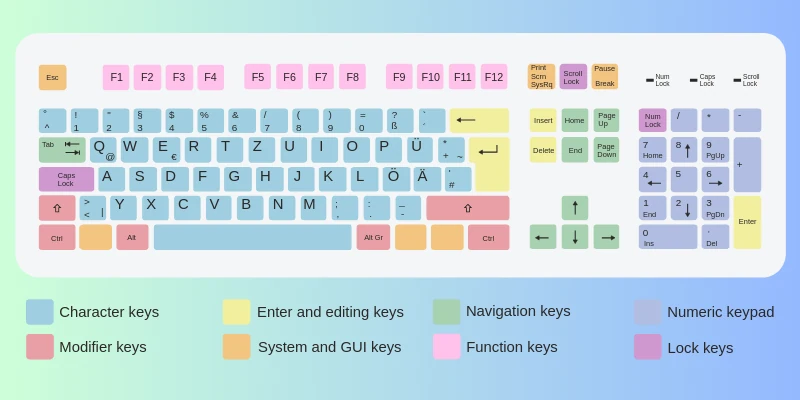
Designers swapped Y and Z, putting frequent Z on the index finger (prime spot). They integrated umlauts (Ä, Ö, Ü – vowel changes that alter meaning, e.g., “schon” = already vs. “schön” = beautiful) and Eszett (ß, sharp S). Access varies: some via dedicated keys, others AltGr modifiers. Standardized in DIN 2137 (Germany’s spec), QWERTZ defines EU hardware, from laptops to POS systems.
3. qwerty and qwertz difference: Visual and Functional Breakdown
QWERTZ mirrors QWERTY 95%, but tweaks matter. Here’s a detailed comparison:
Why the Y/Z Swap Matters
English: Y > Z (e.g., “you,” “yes”). German reverses it, making QWERTZ 4-7% faster for locals per corpus studies. Umlauts avoid “precomposed” hacks, reducing errors.
4. Punctuation, Symbols, and Edge Cases
QWERTZ relocates @ (AltGr+Q), curly braces (AltGr+shifts), backticks. Quotes use „ “ (German style). This trips programmers: Python dicts or JSON need remaps. Hyphens/underscores swap on some variants. Mobile? Android/iOS detect region.
5. Typing Experience: Speed, Comfort, and Language Fit
English Users on QWERTY: Seamless – 100+ WPM peaks, IDE shortcuts intact (Ctrl+C/V). Global compatibility shines.
German Users on QWERTZ: Z/umlaut flow cuts modifiers by 20-30%; less cognitive load. Bilinguals toggle effortlessly.
Studies (e.g., German corpora) show language-matched layouts boost accuracy 5-10%.
6. Pros and Cons of QWERTY
| Advantages |
|---|
|
| Disadvantages |
|---|
|
7. Pros and Cons of QWERTZ
| Advantages |
|---|
|
| Disadvantages |
|---|
|
8. Regional Usage, Variants, and Global Context
QWERTY: Americas, UK, Asia English markets. Variants: QWERTZ-like but minor (e.g., Brazilian ABNT2).
QWERTZ: DACH core; Czech/Slovak/Polish variants add diacritics. Others: AZERTY (France), QWERTI (Italy? Rare).
Laptops often multi-label for tourists.
9. Switching Layouts: Step-by-Step Guide and Challenges
Challenges: Muscle memory fights (1-2 weeks pain); shortcuts clash (e.g., Z/X/C/V undo/copy).
How-To:
- Windows: Settings > Time/Lang > Add German > Keyboard options.
- macOS: Sys Prefs > Keyboard > Input Sources > German.
- Linux: Locales > de_DE.
- Practice: keybr.com, typingclub.com.
- Aids: Stickers (kbd.st), dual keyboards, AutoHotkey remaps.
Top FAQs: Answering High-Search Questions

- Be Respectful
- Stay Relevant
- Stay Positive
- True Feedback
- Encourage Discussion
- Avoid Spamming
- No Fake News
- Don't Copy-Paste
- No Personal Attacks
- Be Respectful
- Stay Relevant
- Stay Positive
- True Feedback
- Encourage Discussion
- Avoid Spamming
- No Fake News
- Don't Copy-Paste
- No Personal Attacks
