What is WAN? Explanation of Wide Area Network
Published: 26 Nov 2025
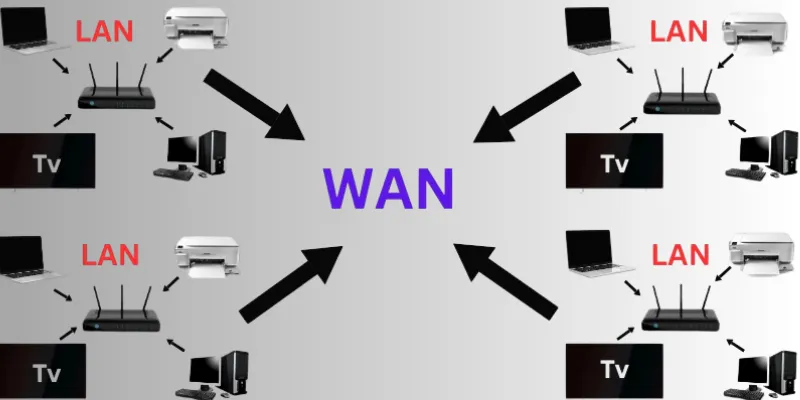
A Wide Area Network (WAN) is a type of computer network that covers a large geographical area. It can connect devices across cities, countries, or even continents. WANs are used by businesses, governments, and schools to share data and communicate over long distances. The internet itself is the largest example of a WAN. Unlike Local Area Networks (LANs), which are limited to a small space like a room or building, WANs stretch across miles. These networks often rely on public or private data lines, satellites, or fiber connections. They play a huge role in making long-distance communication fast and reliable. Today, most global organizations rely on Wide Area Networks to run daily operations smoothly.
Definition of Wide area network
A Wide Area Network (WAN) is a type of computer network that connects devices over large distances, such as between cities, countries, or continents. Unlike local networks that work in a single building or area, WANs allow people and systems in far-off locations to communicate and share data using internet lines, satellites, or leased telecom services.
History of Wide area network
The history of Wide Area Networks (WANs) began in the 1960s with the rise of computer communication. One of the first and most important developments was the ARPANET, created by the U.S. Department of Defense. ARPANET connected computers across long distances using telephone lines, marking the start of long-distance digital networking. It allowed researchers in different locations to share data and resources. This early system laid the groundwork for future WAN technology. In the 1970s and 1980s, WANs started using satellite and leased lines for more reliable connections. These networks were mainly used by governments and large institutions. Over time, the technology improved, making it faster and more accessible. WANs became more common in business and education. This growth set the stage for the internet as we know it today.
As computer technology advanced, WANs grew more powerful and widely used. In the 1990s, businesses began connecting offices across cities and countries using WANs. This allowed them to share files, run software, and communicate more easily. The rise of the internet, which is the largest WAN, changed how the world works. WANs started using fiber optics, wireless signals, and virtual networks to improve speed and security. With the introduction of MPLS and VPNs, WANs became even more secure and reliable. Today, WANs support online banking, remote work, cloud services, and more. Newer technologies like SD-WAN offer smarter and more flexible network control. WANs are now used by almost every industry around the world. From the early ARPANET to global internet connections, WANs have come a long way.
Working of Wide area network
A Wide Area Network (WAN) works by connecting smaller networks, like LANs, across long distances. It uses routers, switches, and communication lines to send data from one location to another. The data travels in small pieces called packets, which are routed through public or private networks. WANs often rely on telecom providers for internet or leased line access. These providers carry the data using fiber optics, satellites, or phone lines. The goal is to let users in different cities or countries access shared resources, like servers or applications. WANs also use IP addresses to identify and direct the data properly. Everything happens quickly so users can connect in real time.
Modern WANs use different technologies to work efficiently and securely. MPLS (Multiprotocol Label Switching) helps direct data quickly and reliably. VPNs (Virtual Private Networks) keep data private while traveling over public networks. SD-WAN (Software-Defined WAN) is a newer system that uses smart software to manage traffic. This makes the network more flexible and cost-effective. WANs also include firewalls and encryption to protect sensitive information. Network devices like modems and routers play key roles in connecting distant users. All these tools work together to keep WANs running smoothly. They help people and businesses stay connected no matter where they are.
Components of Wide area network
1. Router
Directs data between networks and chooses the best path for it to travel. It connects local networks (LANs) to the wider WAN.
2. Modem
Converts digital data into signals that can travel over phone or cable lines. It also receives signals and changes them back into readable data.
3. Switch
Sends data to the correct device within a local network. It helps manage traffic inside the LAN, which connects to the WAN.
4. Transmission Media
Carries data across distances using fiber optics, satellites, or wireless. It forms the physical or wireless link between WAN-connected locations.
5. Firewall
Blocks unauthorized access and protects the network from threats. It filters traffic going in and out of the WAN.
6. Server
Stores files, applications, and data that users access over the WAN. It responds to requests from remote computers or devices.
7. Network Interface Card (NIC)
Lets a device connect to a network by sending and receiving data. Every computer or device in a WAN needs a NIC to communicate.
8. Service Provider
Supplies the internet or telecom service used to connect WANs. Examples include companies like AT&T, Vodafone, or Airtel.
9. VPN (Virtual Private Network)
Creates a secure, encrypted connection over the internet. It protects data and allows remote users to safely access the WAN.
10. SD-WAN (Software-Defined WAN)
Uses software to manage traffic and improve performance. It allows faster, smarter, and more flexible connections across sites.
Types of Wide Area network
1. Leased Line WAN
A Leased Line WAN uses a dedicated communication line rented from a telecom provider. This line is only used by the organization, which means no other users share it. It offers fast, secure, and stable data transmission across long distances. Leased lines are always active, making them ideal for businesses that need reliable connections 24/7. These networks are commonly used to connect branch offices in different cities or countries. Since the line is private, the chances of downtime or security issues are very low. However, the cost of leased lines is quite high, especially for long distances. That’s why they are mostly used by large businesses, banks, or government agencies that require secure and consistent communication.
2. Circuit-Switched WAN
Circuit-Switched WAN is one of the oldest forms of WAN technology, similar to how traditional landline phones work. When two devices need to communicate, the network sets up a dedicated communication path or “circuit” between them. This path stays open for the entire duration of the connection. Once the data transfer or call is over, the path is released and made available to others. It’s simple and easy to use, but it has many limitations. For example, bandwidth is wasted when no data is being transferred. It also cannot handle modern internet traffic efficiently, especially for video or large files. Today, circuit switching is rarely used and has been replaced by faster, smarter technologies like packet switching.
3. Packet-Switched WAN
In a Packet-Switched WAN, data is broken into small units called packets before being sent. Each packet may take a different path through the network to reach its destination. Once all packets arrive, they are reassembled into the original data. This method uses the network more efficiently and allows multiple users to share the same lines. It’s perfect for internet use, file sharing, and video streaming. The system is also more flexible and cost-effective compared to circuit switching. Packet switching is used in modern internet communication, including email, cloud services, and websites. It has become the standard for WANs used in both business and personal settings.
4. Cell Relay WAN
Cell Relay WAN is a type of network that sends data in small, fixed-size packets called “cells.” These cells travel quickly through the network and are often used to transmit voice, video, and data all at once. Unlike packet-switched systems that use variable-sized packets, cell relay keeps everything the same size for speed and consistency. This makes it a good choice for real-time services like video conferencing and VoIP. It was once considered an advanced way to manage different types of traffic together. However, it required special hardware and was expensive to set up. Over time, newer and more efficient systems took its place. Still, cell relay helped introduce ideas used in modern networking.
5. ATM (Asynchronous Transfer Mode)
ATM is a high-speed networking system that also uses small, fixed-size packets (cells) to move data. Each cell in ATM is 53 bytes long, which allows smooth and quick delivery. ATM was designed to support voice, video, and data transmission on one network. It was widely used in banks, telecom systems, and large networks that needed guaranteed performance. The consistent cell size makes it predictable and reliable, which is great for real-time communication. However, ATM is complex to manage and more costly compared to newer systems. With the arrival of technologies like MPLS and SD-WAN, ATM is now mostly outdated. Even so, it played a major role in shaping WAN infrastructure during the 1990s and early 2000s.
6. Frame Relay
Frame Relay was a popular WAN technology used in the 1990s to connect offices and networks. It sends data in “frames” over a shared network, which means multiple users can use the same connection. This made it cheaper and more efficient than dedicated leased lines. Frame relay was mainly used for bursty traffic, meaning data that comes in sudden bursts rather than a constant stream. It was widely adopted by businesses to connect remote branches. However, it had limited error-checking and couldn’t handle modern internet demands well. Today, frame relay is rarely used and has been replaced by faster, more reliable systems. But it was important in moving WANs toward better, more flexible communication methods.
7. MPLS (Multiprotocol Label Switching)
MPLS is a modern and high-performance WAN technology that sends data using short labels instead of long network addresses. These labels help routers make faster and smarter decisions, reducing delays and improving performance. MPLS is flexible and can carry all types of traffic—voice, video, and data—on the same network. It offers reliability, speed, and better bandwidth control than older systems. Many large companies use MPLS to connect remote offices securely and efficiently. It also helps prioritize important traffic, like video calls or real-time data. Although more expensive than internet-based WANs, it is trusted for business-critical applications. MPLS is still used in many enterprise networks around the world.
8. Internet-Based WAN
An Internet-Based WAN connects different locations using public internet services instead of dedicated lines. It’s a cost-effective solution for small and medium-sized businesses. Users can connect over broadband, fiber, or mobile internet to access shared resources. Since it uses public networks, companies often use VPNs (Virtual Private Networks) and encryption to keep data safe. This type of WAN is easy to set up and doesn’t require special equipment. It supports cloud services, file sharing, emails, and video conferencing. The main downside is that it depends on internet speed and quality, which can vary. Still, it’s a great option for remote teams and businesses with flexible needs.
9. VPN (Virtual Private Network)
A VPN is a secure connection that allows users to access a WAN over the internet safely. It creates a “tunnel” that encrypts data, keeping it private even when sent over public networks. VPNs are widely used by remote workers and businesses to access company networks from different locations. This technology helps protect sensitive information, like passwords and business files. It’s cost-effective because it uses the existing internet instead of private lines. Setting up a VPN is simple, and many services offer apps for easy use. However, the speed can depend on the internet connection and server location. Still, VPNs are an affordable and secure WAN solution for modern organizations.
10. SD-WAN (Software-Defined WAN)
SD-WAN is a newer, smarter type of WAN that uses software to manage and control network traffic. It automatically chooses the best path for data, improving performance and reducing delays. SD-WAN can use multiple internet connections (like broadband and LTE) at the same time. It’s more flexible and easier to manage than traditional WANs. Businesses love it because it’s cost-effective, secure, and scalable. It also offers centralized control, meaning everything can be managed from one place. SD-WAN is perfect for companies with cloud-based tools or multiple branch offices. It’s quickly becoming the future of WAN technology due to its many benefits.Bottom of Form
| Benefits of WAN |
|---|
|
A WAN connects multiple local area networks (LANs) over long distances, letting people in different places share data and resources. It helps businesses, schools, and governments communicate smoothly across cities or countries.
A LAN covers a small area like a home or office, while a WAN covers large areas like multiple cities or countries. WANs use more complex tools and links to connect distant locations.
Yes. WANs often use encryption, VPNs, and firewalls to keep data safe. Many businesses use these tools to protect important information.
Some popular types include leased lines, MPLS, VPNs, Metro Ethernet, and SD‑WAN. Each offers different balances of cost, speed, and flexibility.
MPLS is a traditional method using labels to direct traffic privately and reliably. SD‑WAN is newer; it uses smart software to choose the best path across multiple links, making it more affordable and flexible .
Yes. Businesses can build WANs over the internet using VPNs or tunneling to secure the connection. It’s a cheaper option than leasing private lines
It speeds up WAN connections by using tools like compression, caching, and smart routing (SD‑WAN). This boosts performance and saves bandwidth.
Conclusion
So guys, in this article, we’ve covered Wide Area Network in detail. You’ve learned what a WAN is, how it works, and why it matters in today’s connected world. If you’re working in a growing business or managing teams across locations, I personally recommend exploring WAN setups. They can really improve how your data flows, how fast your systems run, and how securely your teams connect. It might seem technical, but it’s worth the effort if you want smoother daily operations. If this helped you understand WANs better, leave a comment below or share this with someone who’s looking to improve their network setup.

- Be Respectful
- Stay Relevant
- Stay Positive
- True Feedback
- Encourage Discussion
- Avoid Spamming
- No Fake News
- Don't Copy-Paste
- No Personal Attacks
- Be Respectful
- Stay Relevant
- Stay Positive
- True Feedback
- Encourage Discussion
- Avoid Spamming
- No Fake News
- Don't Copy-Paste
- No Personal Attacks
